
%20Logos%202022/sharetru-white-logo.svg)
Why Sharetru?
Platform
Every few weeks someone forwards me a “best managed file transfer for government” roundup and asks where we land on it. Fair question, awkward answer: we’re on those lists, so weigh what I say about the other names accordingly.
There’s a bigger problem with those lists than the bias of whoever wrote them, though, and it shows up before you reach the first feature row. Half the platforms on a typical shortlist aren’t competing with each other at all. They’re different categories of product that happen to share a search term.
Then there’s the FedRAMP column, which is worse. Not because the checkmarks are wrong, but because a checkmark can’t hold what’s actually in that cell. Four different compliance states are hiding under it right now, and none of them tell you which deployment of that vendor’s product you’d be buying. Those are two separate ways to fail an assessment while holding a chart that said you were fine.
Sort the categories out first. Fix the FedRAMP column second. The decision gets much smaller than it looked.
Sharetru is on this list, and I’ll make the case for us at the end. We’re built for a specific buyer: a small or mid-sized defense contractor, or a lean agency team, that has to move CUI in and out of its environment and doesn’t have two spare people to run a file transfer platform. Several branches in this post lead somewhere other than us, and I’ll say so when we get there.
What I can speak to without hedging is how the compliance machinery actually works, because we live inside it. Sharetru holds a FedRAMP Moderate authorization, originally issued as a JAB P-ATO, and we’re reassessed every year. I know exactly what sits underneath our checkmark. It isn’t the same thing that sits underneath everyone else’s, and that gap is most of what this post is about.
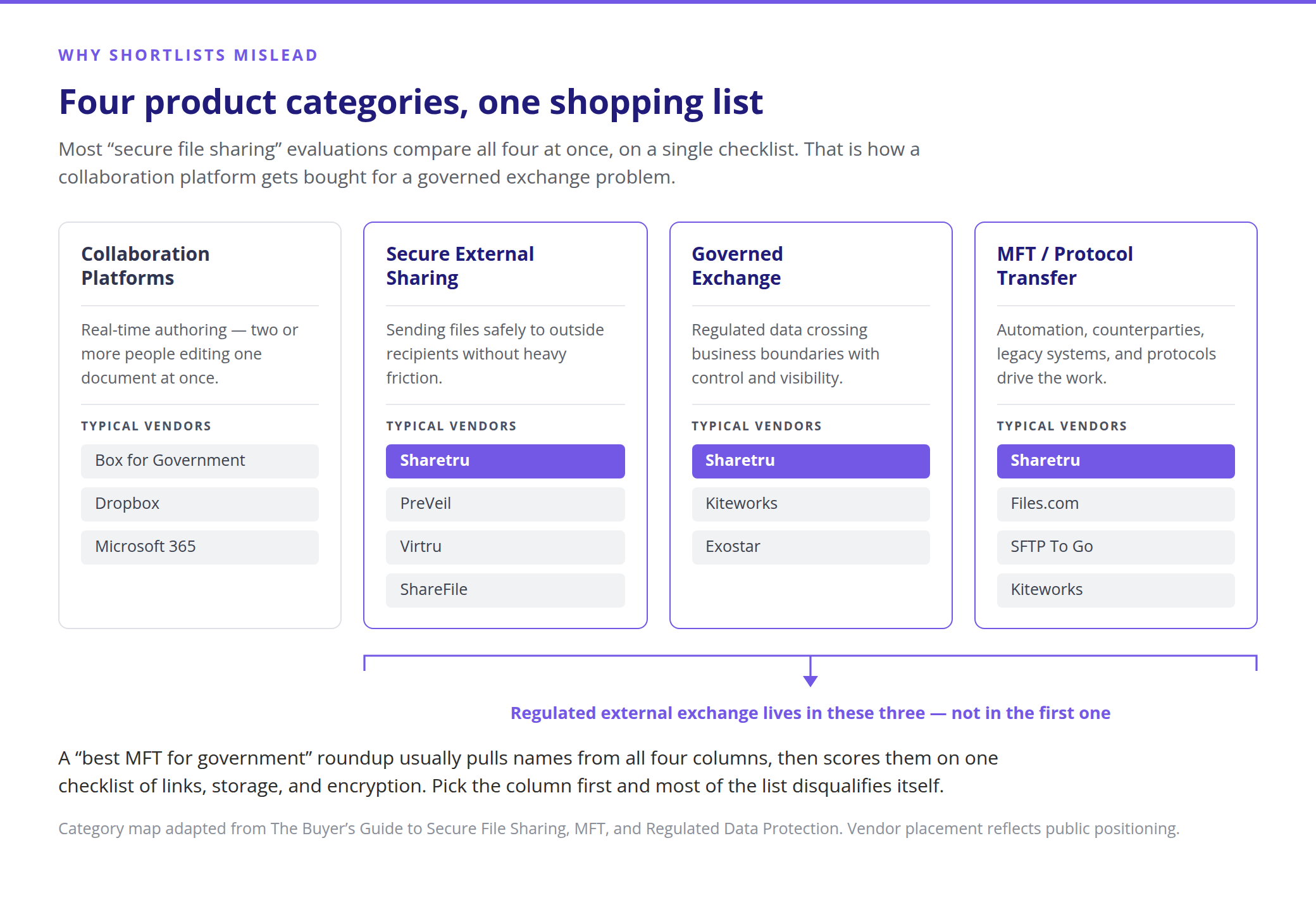
When we sat down to write our own buyer’s guide this year, the first thing we had to do was pull the categories apart, because they don’t do the same job.
One note on that first category, because the word does real damage on these lists. When a roundup calls a platform a collaboration tool, what it almost always means is real-time authoring — co-editing a document. That is a narrow, specific capability, not a synonym for working with other people.
Getting a contract package to a Prime, or moving CUI to a subcontractor, is collaboration in every ordinary sense of the word, and it is what the other three categories exist to do. Read collaboration as co-authoring whenever you see it in a comparison chart, and the categories stop blurring together.
A collaboration platform and a protocol transfer tool are both “secure file sharing” in a search box, and both will land on your shortlist. They answer completely different questions. That’s how a team ends up buying a content cloud to solve a governed exchange problem, or a narrow transfer utility for a problem that was really about whether business users would adopt it.
Four questions sort this faster than any feature chart:
Answer those honestly and half your shortlist disqualifies itself before you’ve compared a single feature. Most evaluations skip them and go straight to who has links, storage, and encryption, which every platform in all four columns will happily say yes to.
If your answers put you in governed exchange or protocol transfer with regulated data in scope, one column does most of the remaining work. And the column everybody treats as binary is carrying four distinct situations.
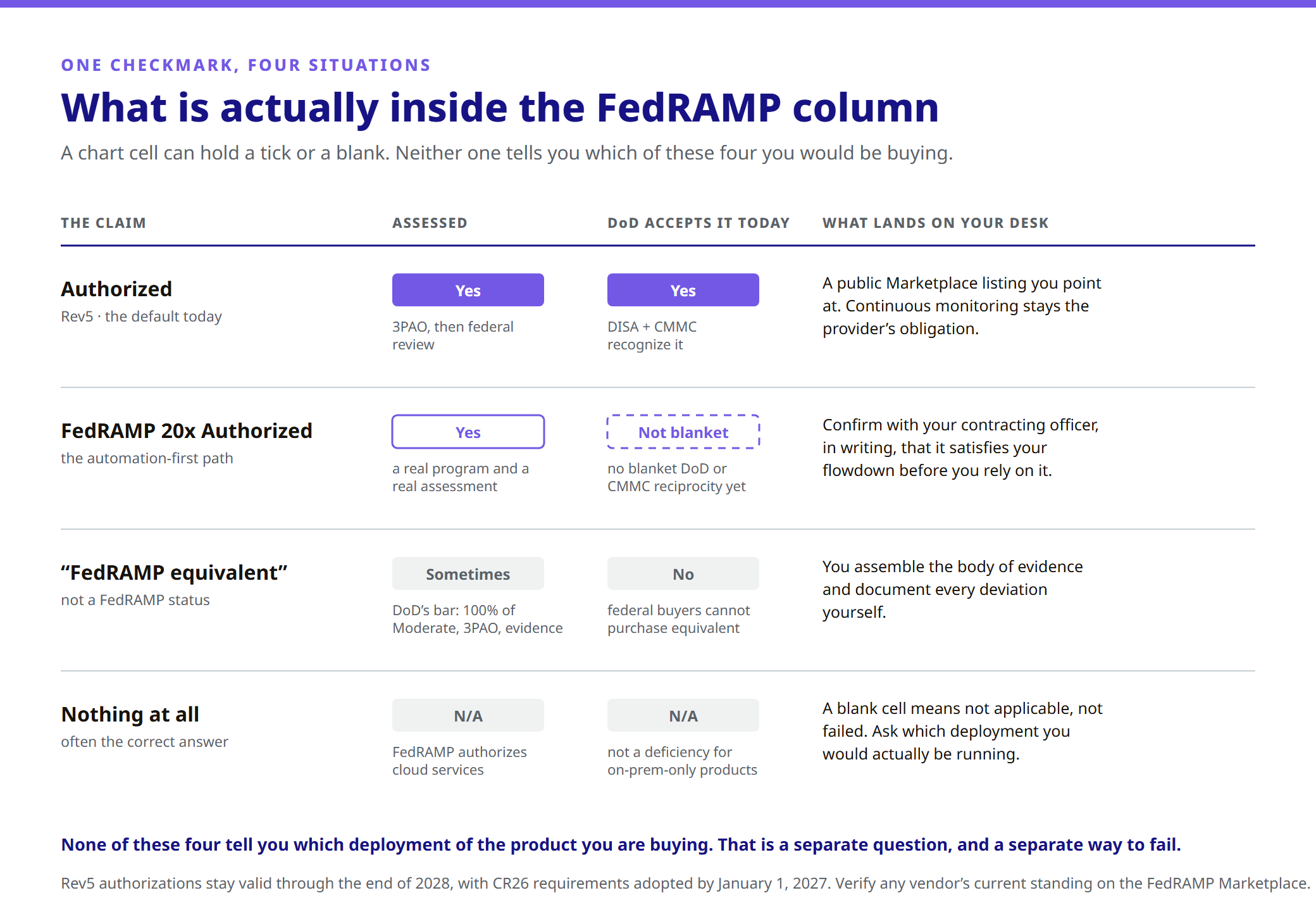
One timing note, because it explains something you’ll see on vendor pages. NIST SP 800-53 Rev5 authorizations stay valid through the end of 2028, with CR26 requirements adopted by January 1, 2027. A provider still on Rev5 in 2027 isn’t lagging. In a lot of cases it’s a deliberate choice, precisely because of the reciprocity question above.
This is the error most likely to hurt you, and it’s the one no roundup catches.
A FedRAMP authorization attaches to a specific cloud service inside a specific boundary. It doesn’t attach to a company, and it doesn’t travel with the logo.
Most platforms on your shortlist sell more than one deployment model: a fully hosted service, a self-hosted product you run in your own datacenter, and increasingly a “deploy into your own cloud tenant” option. Those aren’t variations on a theme. From a compliance standpoint they’re different products with different answers.
If a vendor holds an authorization for their hosted offering and you buy the self-hosted version, you inherit nothing. Not the boundary, not the continuous monitoring, not the Marketplace listing, not the evidence package. You own all of it. The vendor’s page still says FedRAMP, and it’s still true, and it has nothing to do with what you deployed.
The related nuance is inheritance, and I’d rather explain it plainly than let it sound like a gotcha, because it’s how we work too. A SaaS product frequently runs inside an already-authorized hosting environment and gets assessed at the SaaS layer as part of that environment’s annual audit. That’s legitimate and it’s common. It’s ours. But it means the right question isn’t “are you FedRAMP authorized.” It’s four questions:
Any vendor worth buying from can answer all four in one email. A vendor who answers with a logo is telling you something.
Since I’m asking you to run that on everybody, run it on us. Sharetru sells three platforms: a commercial tier certified to SOC 2 Type II, a HIPAA-audited tier, and Sharetru Federal, which is the FedRAMP Moderate authorized one. If you need FedRAMP, the paperwork has to say Sharetru Federal. That’s different from the trap I described above, because these are separate products with separate names rather than one product sold in an authorized and an unauthorized deployment. But you still have to pick correctly, and I’d rather say so than let you assume our logo covers everything. It doesn’t. Nobody’s does.
This is also the honest reason a blank FedRAMP cell isn’t automatically a deficiency. If a product is genuinely on-premises-only, FedRAMP isn’t the right question to ask about it, because FedRAMP authorizes cloud services. A blank cell there means “not applicable,” not “failed.” But a blank cell and a checkmark look equally definitive on a chart, and neither one is telling you the truth about what you’d actually be running.
Every platform in this category ships security patches. Ours included. That’s not a differentiator, it’s the job. So here’s the argument that actually holds up.
Managed file transfer has been one of the softest targets in enterprise software for three straight years running. MOVEit in 2023 became one of the largest data-exfiltration events of the decade. Cleo’s transfer products got mass-exploited the following year. CrushFTP and GoAnywhere have each had critical, actively exploited vulnerabilities since. That list includes products sitting on this shortlist, and I’m not raising it to score points off anybody. The pattern is the point. An MFT platform concentrates your most sensitive data in one place and exposes it to the internet on purpose. That’s the whole value proposition and it’s also the whole risk. Nobody in this category goes three years without a serious CVE, and any vendor implying otherwise is selling you something.
So the question isn’t who has vulnerabilities. It’s who’s obligated to find them, fix them on a clock they didn’t set, and prove it to somebody other than their own board.
That obligation just got specific. CISA’s Binding Operational Directive 26-04 reorients federal patching around risk rather than uniform severity, and it requires agencies to make sure the cloud services holding their data meet the same standard. FedRAMP’s Rev5 vulnerability detection, evaluation, and reporting rules are how that lands on providers. Mandatory December 7, 2026, with a grace period closing March 7, 2027.
Two things in it should change how you read a shortlist.
The fix clock is driven by reachability. Every vulnerability gets a Potential Agency Impact rating, N1 through N5, and the remediation window collapses when a flaw is both likely exploitable and internet-reachable.
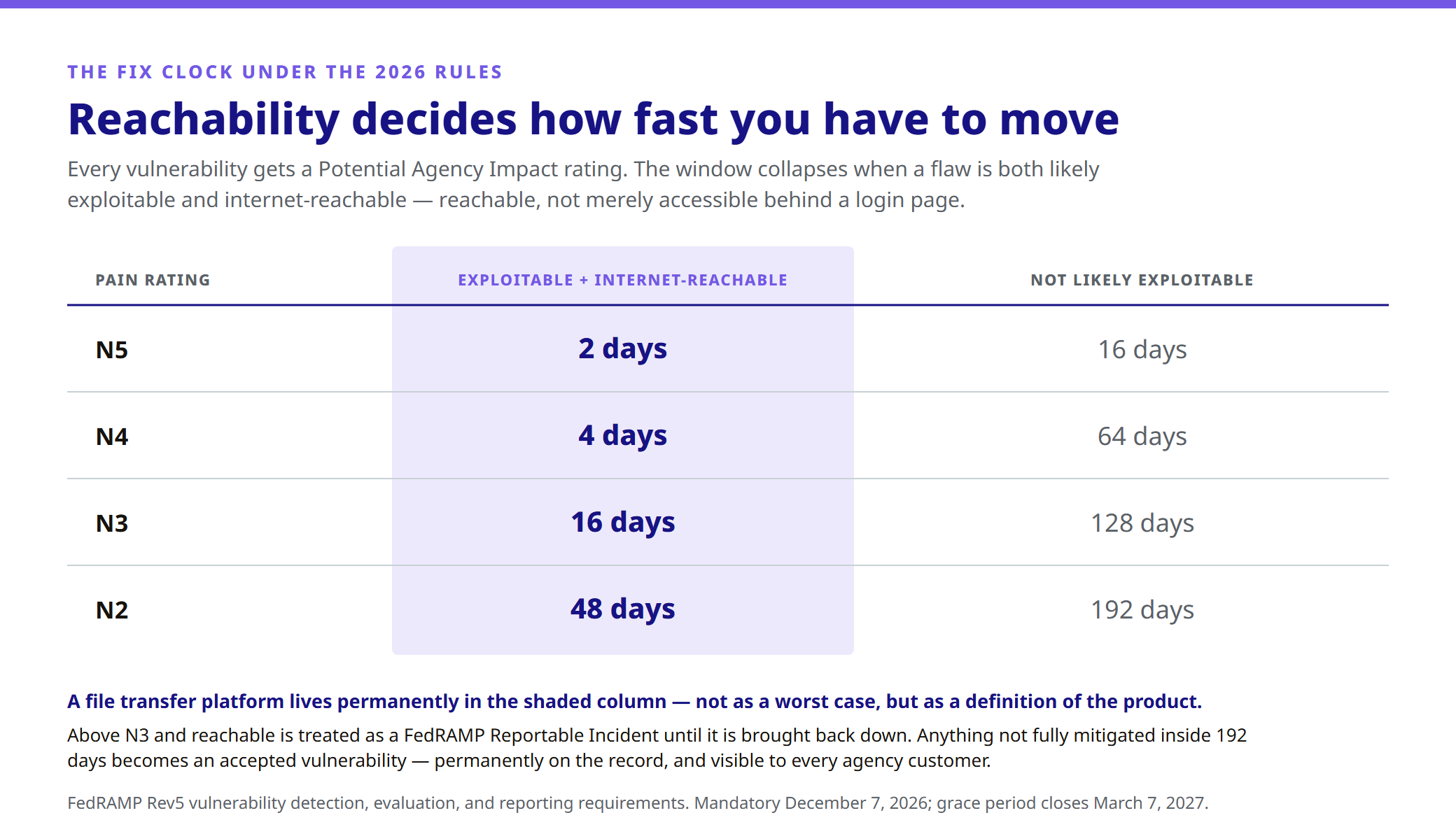
A file transfer platform lives permanently in that left column. Not as a worst-case scenario. As a definition of the product. And reachability gets judged as internet-reachable rather than merely internet-accessible, so you can’t argue your way out of it by pointing at the login page. Above N3 and reachable, it’s treated as a FedRAMP Reportable Incident until it’s brought back down. Anything not fully mitigated inside 192 days becomes an accepted vulnerability, permanently on the record and visible to every agency customer.
Hold that against the last three years. The MOVEit-shaped event, under these rules, is a two-day clock and an incident report rather than a disclosure timed to a press cycle.
“Vulnerability” no longer means “CVE.” FedRAMP explicitly counts an out-of-date control statement in your Security Decision Record as a vulnerability requiring detection and remediation, and the same goes for a failure in your own detection process. So the obligation isn’t running scanners on schedule. It’s keeping your documentation continuously true about a system that keeps changing, which is a very different job and a much harder one to sustain with a part-time admin.
None of this attaches to a self-attested equivalency claim. None of it attaches to a self-hosted deployment either, where the detection, the rating, the clock, the documentation currency, and the evidence are all yours.
This is the single biggest miss we see in evaluations.
Teams put SFTP and FTPS near the bottom of the requirements document, in the section IT fills in after the decision is basically made. Then, six weeks after signing, somebody inventories the file movement and finds that a third of it is automated jobs and counterparty connections nobody had written down.
If your environment depends on counterparties, legacy systems, scheduled jobs, or operational file movement, protocol support isn’t a feature comparison. It’s a category filter, and it changes which column of that map you’re shopping in. Collaboration-first platforms either won’t support it or will bolt something on. Transfer-first platforms will support it beautifully and then lose your business users, who go back to email because the interface wasn’t built for them.
The failure mode that costs the most is when the sharing side and the transfer side get bought separately, because no single platform looked like it covered both. Now you’re running two products, two access models, two audit trails, and two things to prove out in an assessment. For one workflow.
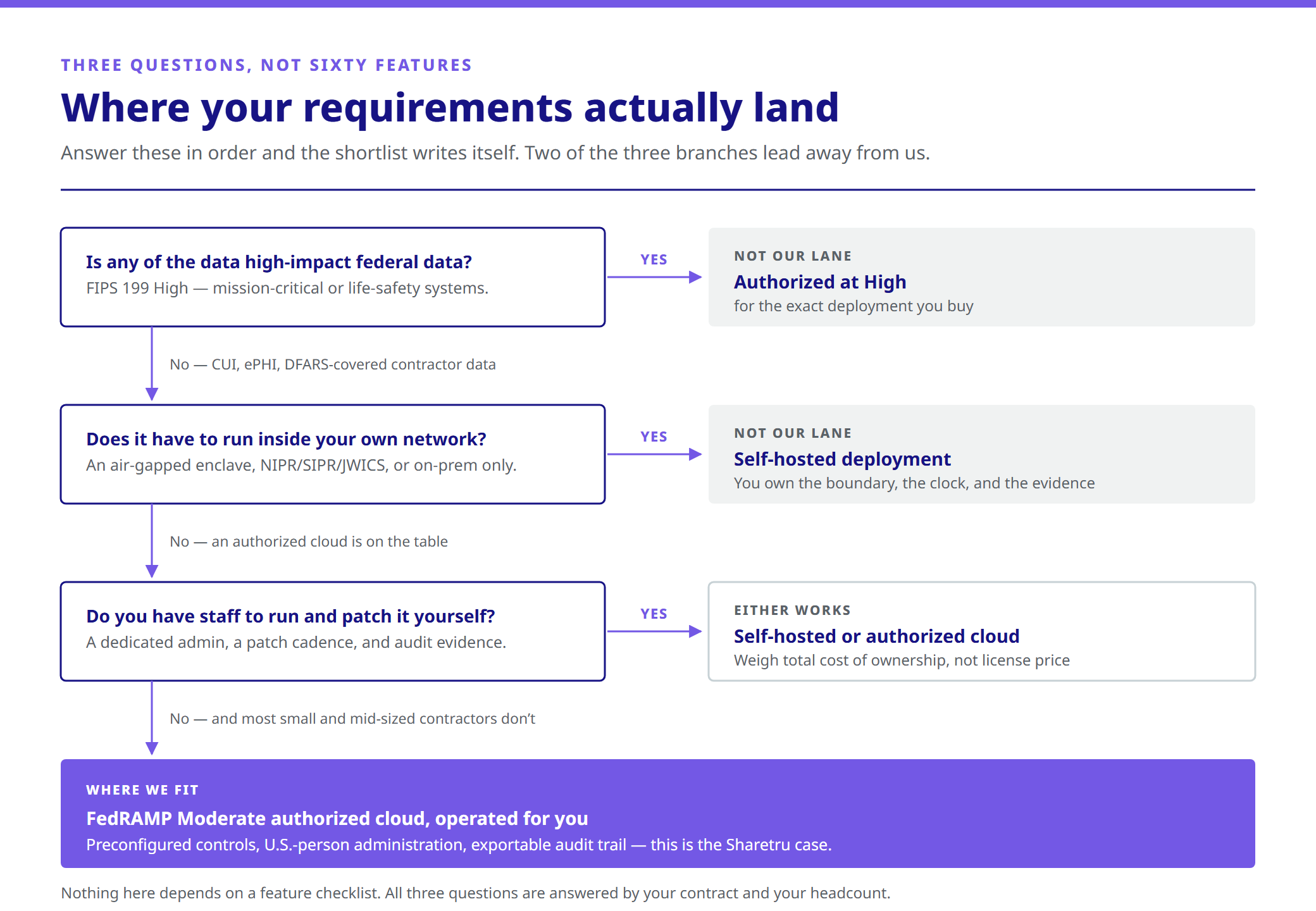
None of these are about features. They’re answered by your contract and your headcount.
Is any of the data high-impact federal data? If you’re inside a FIPS 199 High system, you need a platform authorized at High for the deployment you’re buying. Moderate covers CUI, ePHI, and the large majority of contractor data. But if you’re High, we’re not on your shortlist, and I’d rather say that here than waste your time on a call.
Does it have to run inside your own network? An air-gapped enclave, a NIPR/SIPR/JWICS requirement, or a hard on-premises mandate points you at a self-hosted deployment. No authorized cloud, ours included, solves that problem. Just go in knowing that the self-hosted deployment of a FedRAMP-authorized vendor is not a FedRAMP-authorized service.
Do you have staff to run and patch it yourself? This is the question buyers underweight most, and it’s where the money actually is. Self-hosted means you own the infrastructure, the patch cadence, the hardening, the vulnerability evaluation and reporting, the documentation currency, and the evidence that all of it is happening. And you own it during an assessment, when somebody asks you to prove it. If you’ve got a dedicated admin and a patching discipline you’d be comfortable defending to a C3PAO, self-hosted is a genuinely good answer. If you’re a 40-person shop where the same person runs Microsoft 365, the VPN, and the help desk, an authorized cloud isn’t a luxury. It’s the only version of this that’s still compliant on a Tuesday in November.
Two things worth doing before you talk to any vendor on this list, us included.
Map what you actually have. Which departments send files, who receives them, which protocols are in play, and which compliance framework attaches to each type of data. This is the exercise that surfaces the automations nobody remembers building, and that’s usually where the migration risk lives, not in the user-facing part.
Then price the whole workflow. A self-hosted platform’s subscription is the smallest line in its total cost. Add infrastructure, patching, the administrator’s time, and the hours spent keeping evidence current for an assessment. Count the sprawl too. A cheaper tool that still needs a separate sharing layer, a separate transfer layer, and manual compliance workarounds usually costs more in practice than the platform that covered the whole workflow. And here’s the cost nobody lines out: if the platform is too clunky for outside recipients, people route around it, and every side channel they invent is an exposure you aren’t monitoring.
Here’s the case for us, clearly labeled so you can weigh it accordingly. If most of these describe you, we’re probably the strongest option on your shortlist.
You’re a small or mid-sized defense contractor with DFARS 252.204-7012 in your contract. You need a cloud service touching CUI that’s authorized rather than self-attested. A Marketplace listing you point at, not an evidence package you have to chase. Our FedRAMP Moderate authorization was originally issued as a JAB P-ATO, which still carries real weight with agency reviewers.
You want the authorization DoD actually accepts today. We’re deliberately staying on Rev5 rather than racing to a 20x badge, because Rev5 is what DISA and CMMC assessment currently recognize. That’s a choice we made for your contract, not for our marketing page.
You need both halves of the problem in one platform. Business users get secure links, guest access, view-only delivery, and watermarking. IT and operations get scheduled and automated transfers over SFTP, FTPS, and FTPeS, plus FTP in non-federal environments. One platform, one access model, one audit trail, instead of two products stitched together for a single workflow and two things to defend in an assessment.
Once you’re on Sharetru Federal, there’s no unauthorized way to deploy it. Being precise here, since I just spent a section warning you about exactly this. We sell three products: a commercial tier with SOC 2 Type II, a HIPAA-audited tier, and Sharetru Federal. The FedRAMP Moderate authorization is Sharetru Federal, so the contract needs to say Sharetru Federal. What you get in return is that there’s no second way to buy it. No self-hosted variant, no deploy-in-your-own-tenant option, no configuration that quietly puts you outside the boundary. One product, one deployment, one authorization.
You have nobody to run a file transfer platform. Controls arrive preconfigured rather than assembled. Compliance documentation is ready to execute rather than requested. You get a named Customer Success Manager instead of a ticket queue. And the detection, evaluation, PAIN rating, remediation clock, and reporting under the 2026 rules are our obligation on FedRAMP’s schedule, not a job that lands on the person who also runs your help desk.
You handle ITAR-controlled technical data. 100% U.S.-owned infrastructure with U.S.-person administration is what makes that workable, and it’s a question most platforms answer badly or not at all.
CMMC Level 2 is in your future. No one knows what CMMC is going to look like after the pause. But we’ve been given plenty of information to believe it’s not going away. Our FedRAMP Moderate authorization carries reciprocity with CMMC Level 2 controls, which makes the file transfer portion of your assessment meaningfully smaller.
Your auditors want evidence that leaves the platform. Everything from both halves lands in the same immutable, exportable audit trail, and you can push it into Microsoft Sentinel or another SIEM. Role-based access control with dual authorization on new accounts. FIPS 140-3 validated encryption in transit with TLS 1.2+, AES-256 at rest.
Now the other direction, because you should hear it here instead of on a call. Our own buying guide scores Sharetru None for internal collaboration, and that isn’t modesty, it’s the design. We didn’t build a content cloud. If heavy real-time co-authoring sits at the centeer of your decision, buy from the first column on that map. We’ll lose that evaluation, and we should. If your use case is narrow and protocol-only, with no governed sharing and no outside-recipient experience to worry about and just files moving between two systems, a pure transfer tool will be cheaper and simpler than us. And we’re Moderate rather than High, cloud only, and built for the U.S. market. Any one of those can be a dealbreaker. If it is, one of the other platforms here is your answer.
If you want the long version of this framework, our Buyer’s Guide to Secure File Sharing, MFT, and Regulated Data Protection walks the six evaluation filters, a ten-platform comparison matrix, and a decision tree in more detail than a blog post can hold. No form, no gate.