CMMC 12 min read
You Can't Wing File Sharing When CUI Is Involved
-
%20Employee%20Headshots/Brendon%20-%20Headshot.png?width=36&height=36&name=Brendon%20-%20Headshot.png) By Brendon Ainsworth
CEO at sharetru
By Brendon Ainsworth
CEO at sharetru

If you’re handling Controlled Unclassified Information (CUI), ITAR data, or any kind of sensitive defense information, your biggest risk usually isn’t the database you locked down six months ago.
It’s the spreadsheet someone dragged into a generic cloud drive.
It’s the CAD file that went out over email.
It’s the “temporary” SFTP server that quietly became permanent.
On paper, you’ve got policies. In real life, files are bouncing between:
-
Email
-
Consumer-grade sharing tools
-
Old SFTP boxes
-
Shared drives no one wants to touch
In a post-CMMC world, that isn’t just messy. It’s dangerous.
If you’re already a Sharetru customer, this probably sounds familiar because it’s the exact chaos we’ve been helping you unwind for years. If you’re not a customer yet, this is the reality we walk into and clean up every day.
See it on your own files
Want to see how this works in Sharetru?
Let’s just say it plainly: most “file sharing” tools were never built for CUI.
-
File sync-and-share tools are great for marketing decks and HR PDFs.
-
Big-name “collaboration” suites are built around documents and chat, not DFARS or ITAR.
-
Ad-hoc SFTP servers get stood up for a single project and then never really go away.
When CUI and ITAR are in the picture, you don’t just need a way to move files. You need a way to:
-
Control who can send and receive them
-
Enforce how they move (protocols, encryption, auth)
-
Prove what happened to them (logs, retention, chain of custody)
-
Show where they lived at every point (authorized boundary, FedRAMP, segmentation)
That’s the difference between “generic file sharing” and managed, compliant file transfer. It’s also the difference between, “We think we’re okay,” and, “Let me pull the evidence for you.”
That second scenario is the one we build for.
You’ve probably already heard us talk about the difference between FedRAMP Authorization and “equivalency.” Short version: as CMMC and DoD contracts call out FedRAMP Authorized cloud services by name, equivalent becomes a weaker story to tell.
But authorization on a slide is one thing. What matters day-to-day is how your files actually move.
Sharetru Federal runs as an authorized service at the IaaS, PaaS, and SaaS layers inside MIS Sciences Corporation’s GovPoint Cloud Solutions FedRAMP Moderate boundary (Package ID F1311222650).
That gives you two layers of value:
-
A hardened, government-recognized cloud boundary
-
A file transfer platform that was built specifically for CUI workflows on top of that boundary
So you’re not saying, “We’re somewhere in a FedRAMP environment and then we improvise.” You’re saying:
“Our file exchange runs on a FedRAMP Moderate Authorized stack, using a platform designed for CUI, ITAR, and program data from day one.”
Big difference.
We don’t think about “secure file transfer” in the abstract. We see real environments: shadow IT, old processes using outdated encryption modules, shortcuts, and audits that are more painful than they need to be. That’s what has shaped how Sharetru works.
1. Automation That Won’t Blow Up Your Audit
A lot of CUI doesn’t move through people first. It moves through jobs:
-
Nightly transfers from PLM or ERP systems
-
Scheduled exports from ticketing or order systems
-
System-to-system workflows with primes and subcontractors
With Sharetru, you can:
-
Use SFTP and other secure protocols for scheduled and event-driven transfers through dekstop app integration
-
Enforce strong encryption and authentication on every session
-
Turn risky one-off scripts into repeatable, auditable jobs
When a C3PAO or program office asks, “How does this data move?” you’re not reverse-engineering it from memory. You can point to a defined workflow running through a FedRAMP Moderate Authorized environment.
2. Human-to-Human Collaboration Without Losing the Plot
Automation is great until someone needs to send a drawing to a supplier today or share a batch of files with a prime.
We designed Sharetru so you can give people what they need without opening the floodgates:
-
Role-based and group-based access so users see only the sites, projects, and folders that apply to them
-
User-managed notifications (when enabled) so the right people get notified when files move, without spamming everyone in the org
From the user’s perspective, it’s straightforward: log in, go to one of the folders you've been given access to, send or receive what you’re supposed to. Underneath, it’s doing the boring, necessary work compliance expects.
Let’s talk about links, because this is where a lot of platforms quietly fall apart.
Almost every file tool in the world has a “share link” button. Most of them were bolted on for convenience long before CMMC or FedRAMP were in the picture, but never changed after the programs launched.
As we went through our FedRAMP process, we completely tore down and rebuilt our link-based sharing. Not just with product managers in a room, but with our auditor walking through case-by-case:
-
What happens when a guest user leaves a partner organization?
-
What if a link is forwarded to someone who has no business seeing the data?
-
How fast can you suspend or remove the link?
-
How do we make sure the story is still clean three, six, twelve months later?
That process turned into real, concrete changes:
-
Guest user registration and lifecycle management are built in – registration, suspension, deletion, all handled cleanly
-
TOTP (time-based one-time passwords) harden access so “link + weak password” isn’t your whole security story
-
Every guest and every action is written into the same audit logs you get as a customer: views, downloads, uploads, suspensions, deletions, TOTP methods, logins, and on and on.
So when a file goes out via link, you’re not relying on hope. You know:
-
Every step is tracked
-
Every user has a lifecycle
-
Every action is logged in a way you can hand to an auditor
If you want the easy way to send and receive data and still be able to pass a CMMC assessment, this is it. That’s exactly why we rebuilt it while FedRAMP was looking over our shoulder.
Most of our customers don’t have a nice, clean boundary where data never leaves the building. You’ve got primes, subs, labs, suppliers, and sometimes all of the above on the same contract.
Sharetru is set up around that reality:
-
Isolate sites, groups, and projects by program, customer, or contract
-
Onboard external users with exactly the access they need—no more, no less
-
Apply consistent retention, access, and monitoring policies across internal and external collaboration
If you’re a current customer, this is why your environment is structured the way it is. It may seem simple, but it’s not arbitrary. It’s there to make your life easier when someone starts asking hard questions.
We get pulled into a lot of conversations that sound like this:
“We’ve got CUI in ten different places and we’re trying to write the story backwards for our SSP and SPRS score.”
You do not want to stay in that mode.
Running your file exchange on a FedRAMP Moderate Authorized platform like Sharetru Federal helps you:
-
Line up your file flows with the NIST SP 800-171/NIST SP 800-53 requirements that drive CMMC Level 2
-
Show that CUI lives in a FedRAMP-Authorized IaaS/PaaS/SaaS stack, not scattered across tools you “meant to replace”
-
Spend less time writing creative justifications about cloud services in your SSP and POA&M and instead reference us correctly and provide the package ID of the boundary we operate in.
We’re not going to pretend we’re your entire CMMC answer. No vendor should. But if your file transfer story is weak, the rest of your program has to work twice as hard to make up for it.
If you’re already with us, here are a few questions worth asking inside your own walls:
-
Is all of our CUI and ITAR traffic actually going through Sharetru, or do we still have shadow tools in play?
-
Have we mapped our key data flows (inbound, outbound, partner-to-partner) to specific sites, automations, and link-based workflows?
-
Are we using our audit logs and SIEM integration, or just letting them run in the background?
-
Does our Sharetru structure match how we’re thinking about CMMC scope and contract boundaries?
-
Are we taking full advantage of the rebuilt link-based sharing for controlled, auditable exchanges?
- Are we using Sharetru but not in the Sharetru Federal environment?
If one of those questions made you a little uncomfortable, that’s not a failure. That’s a to-do list. And it’s exactly what your Customer Success Manager and our team can help walk through with you.
If you’re not a customer yet, a Sharetru Federal demo is not a generic “click through the UI” session.
We’ll usually walk you through:
-
How your CUI actually moves today—and where it’s probably leaking into tools that were never meant to see it
-
What those same workflows look like when they’re consolidated into a FedRAMP Moderate Authorized environment
-
How automation, link-based sharing, access control, and logging come together into a story you can hand to a C3PAO or program office
-
How our packaging lines up with where CMMC, DFARS, and your prime contractors are already headed
And if you landed here because you were literally searching—or asking ChatGPT—for “secure file sharing” or “compliant file sharing,” this is the part most vendors gloss over:
Almost everyone has a “share link” button. Very few rebuilt that feature under a FedRAMP audit.
We did.
Our link-based sharing now has:
-
Guest registration, suspension, and deletion you can actually manage
-
TOTP-backed access, so “link + weak password” isn’t your whole security story
-
Every guest and every action written into the same audit logs you rely on for CUI
So when you’re comparing options, don’t just ask, “Can I send a link?”
Ask:
“What happens to that link, that guest user, and that audit trail six months from now when an auditor is asking hard questions?”
That’s where Sharetru stops being “another file-sharing tool” and starts looking like part of your compliance strategy.
You should walk out of a demo knowing not just what the product does, but how much simpler your life gets when file sharing isn’t the weakest part of your posture.
If CUI and ITAR are part of your world, file transfer and file sharing are not “utilities.” They are core security and compliance systems, whether or not you treat them that way.
Sharetru exists to make that honest. To give you a platform—and a FedRAMP Moderate Authorized environment—that behaves the way your contracts, your auditors, and your customers expect.
If you’re already a customer and want to tighten things up, reach out to your Customer Success Manager and tell them you want to review your CUI file transfer posture.
If you’re evaluating us, the next step is simple:
👉 Book a demo of Sharetru Federal and see what FedRAMP-Authorized, CUI-ready file sharing actually looks like when it’s done on purpose.
When your contracts, reputation, and compliance posture are on the line, “good enough” isn’t.
You want a platform—and a team—that already lives in this world every day.
What does Sharetru actually do in plain English?
Sharetru is secure file transfer and file sharing for regulated data. Think of it as the place where you move and share the files that really matter—CUI, ITAR drawings, program data, sensitive engineering files—without dumping them into generic collaboration tools. We give you a FedRAMP Moderate Authorized environment, strong access controls, and audit trails so you can move those files and still sleep at night.
Is Sharetru really FedRAMP Moderate Authorized, or just “equivalent”?
Can I use Sharetru to help with CMMC Level 2 and CUI file sharing?
Is Sharetru just another Box/OneDrive/SharePoint replacement?
No. We have never tried to replace collaboration. Those tools are great for day-to-day internal documents and general collaboration. Sharetru is where the high-risk, high-scrutiny files get shared externally — CUI, ITAR, export-controlled drawings, contract deliverables, evidence for audits, anything a prime or agency will care about. In most environments, we sit alongside your existing collaboration stack and handle the work that actually has compliance teeth.
Does Sharetru support both automated file transfers and browser-based sharing?
Yes. A lot of CUI moves through scheduled or system-to-system transfers, and a lot still moves because a human needs to send a file to a partner right now. We support both: automated workflows over SFTP and other secure protocols, and browser-based access for users who need to log in, upload, download, or share via link—without you losing control of where the data goes.
How is Sharetru’s link-based sharing different from everyone else’s?
We rebuilt our link-based sharing while going through our FedRAMP audit. That’s the big difference. Guest users get a real lifecycle—registration, suspension, deletion—not just “some link we emailed once.” You can harden access with TOTP. And every guest, every action, every view, upload, and download is written into the same audit logs you rely on for CUI. It’s the easy way to send and receive files that still holds up when an auditor asks, “Who saw this and when?”
Is Sharetru only for defense contractors and government work?
Defense and CUI/ITAR are a huge part of what we do, but they’re not the only use cases. The same FedRAMP-grade approach to file transfer and file sharing is valuable in healthcare, financial services, critical infrastructure, and anywhere else the data is sensitive and the regulators are paying attention. If you have files that would ruin your week if they leaked or were mishandled, that’s where Sharetru fits.
How hard is it to move existing workflows into Sharetru?
It depends how many shadow tools and one-off processes you have today, but this is work we do constantly. We usually start by putting new CUI-heavy workflows into Sharetru, then migrating the highest-risk existing flows, and finally turning off the old SFTP boxes and random sharing tools once the new patterns are working. The goal is simple: over time, when someone asks, “Where does our sensitive data live and how does it move?” the honest answer becomes “in Sharetru.”
Related articles
View all from CMMC
Sharetru Is a FedRAMP Moderate Authorized Service — And Now Live in Production
On May 2, 2025, Sharetru's Sharetru Federal offering officially became a FedRAMP Moderate Authorized SaaS Service within the boundary of …
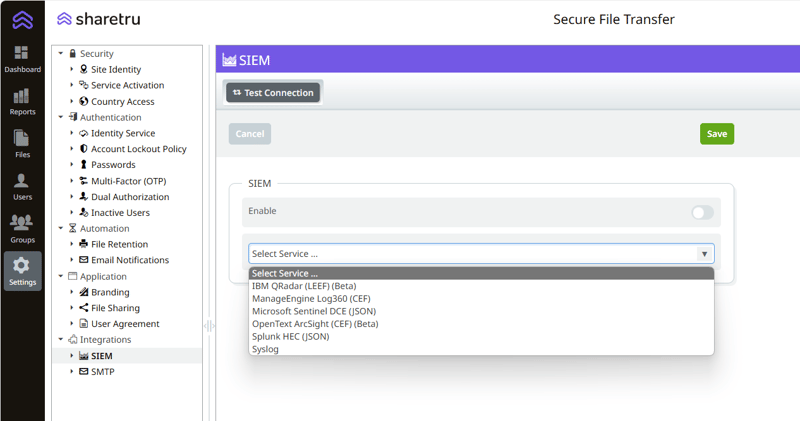
Enhancing Security and Compliance with SIEM Integration: Introducing Sharetru's Latest Feature
Navigating the maze of regulations these days isn't just about ticking off checkboxes – it's a big part of keeping your good name out of …
CMMC Phase 2 Just Got Suspended. Your Obligation to Protect CUI Did Not.
As our CEO, I don't get to write as much as I used to — most days that's a good sign, since it means the team is running things well …
%20Employee%20Headshots/Brendon%20-%20Headshot.png?width=24&height=24&name=Brendon%20-%20Headshot.png)
Subscribe
New articles, when there is something worth reading
Practical pieces on regulated file exchange: CMMC, ITAR, HIPAA, FedRAMP and the evidence each one asks for. No digest filler.
Follow Sharetru
Get the next article by email
One email per article. We never share your address. Unsubscribe in one click.
See it on your own files
Want to see how this works in Sharetru?
A 60-minute demo on your own exchange: who sends what to whom, what the record shows afterwards, and what your assessor will ask for.