
%20Logos%202022/sharetru-white-logo.svg)
Why Sharetru?
Platform
If you're responsible for security or compliance at your organization, you already know the problem: your file transfer platform is handling sensitive data every day — uploads, downloads, logins, share links — and that activity needs to be visible inside your SIEM, not buried in a portal you check manually.
We hear this question from customers regularly. A recent support inquiry put it plainly: "We are looking to ingest Sharetru Federal logs into our SIEM. Do we have this capability?"
The short answer is yes — but it depends on the age of your Sharetru plan. Sharetru supports SIEM integration, and customers are already running it successfully with platforms like Microsoft Sentinel. In this post, I'll walk you through what it looks like, what events get captured, and what you can do with that data once it's flowing into your SIEM.
Your SIEM is your security nerve center — it correlates events across systems to surface anomalies, trigger alerts, and provide an auditable chain of evidence for compliance reviews. But it only works if the right data sources are feeding it.
File transfer platforms are often overlooked. That's a problem, because they sit at the edge of your environment where external parties — vendors, partners, government clients — are exchanging sensitive files. A single unauthorized access event, a suspicious login from an unrecognized IP, or an MFA bypass attempt on a shared account could be a serious incident — and you'd never see it without log visibility.
For organizations operating under FedRAMP, CMMC, HIPAA, or SOC 2 (and others), this isn't optional. These frameworks explicitly require audit log retention, monitoring of authentication events, and the ability to reconstruct timelines during incidents. Sharetru's SIEM integration exists precisely to help you meet those requirements.
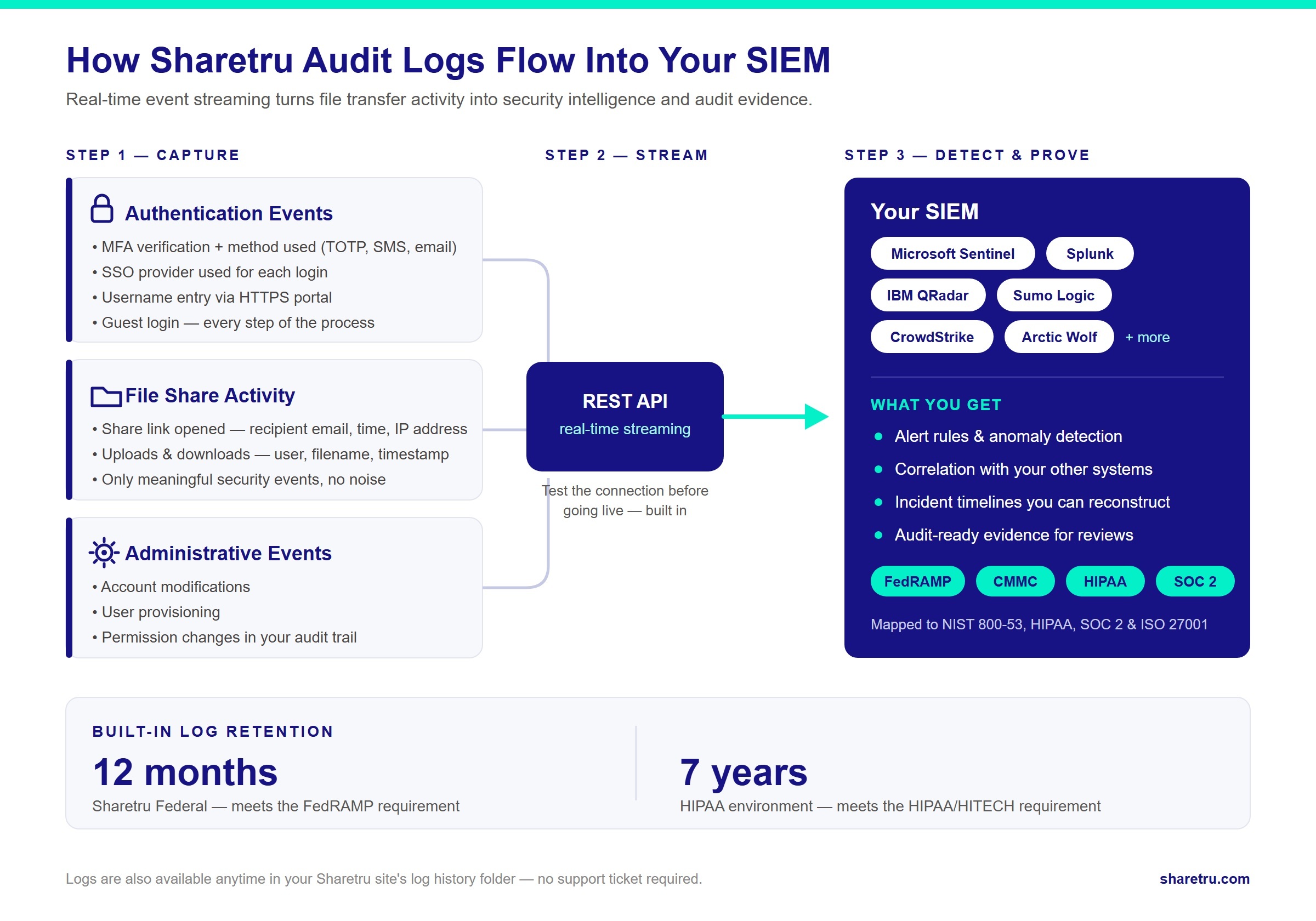
When SIEM integration is configured, Sharetru streams log events in near real time. Here's a short list of key items (but not even close to exhaustive) that are captured:
Note for FedRAMP customers: Because Sharetru Federal operates under NIST 800-53 rev 5 (FedRAMP Moderate), log retention and audit trail requirements are built into the platform by design — not bolted on.
Sharetru's event logging isn't just operational telemetry — it's designed to produce the audit evidence that regulators and auditors require. Below is how the events above map to specific controls across the major frameworks.
Note for FedRAMP customers: Because Sharetru Federal operates under NIST 800-53 rev 5 (FedRAMP Moderate), log retention and audit trail requirements are built into the platform by design — not bolted on.
Sharetru integrates with a wide range of SIEM platforms through REST API and vendor specific formats. Supported platforms include Splunk, IBM QRadar, Sumo Logic, CrowdStrike, Arctic Wolf, Microsoft Sentinel, and many others.
We've chosen Microsoft Sentinel for the walkthrough below simply because it's a common platform among Sharetru customers, but the same general approach applies across platforms. Here's the setup path:
Important: Not every user action generates a log event — only meaningful security and authentication events do. If you're seeing gaps in data, check whether the activity you're expecting (such as a simple file browse without a download) is actually a logged event type.
Using a different SIEM? If it can ingest logs via the Sharetru integrations, it can receive your event stream. Contact our support team for platform-specific configuration guidance.
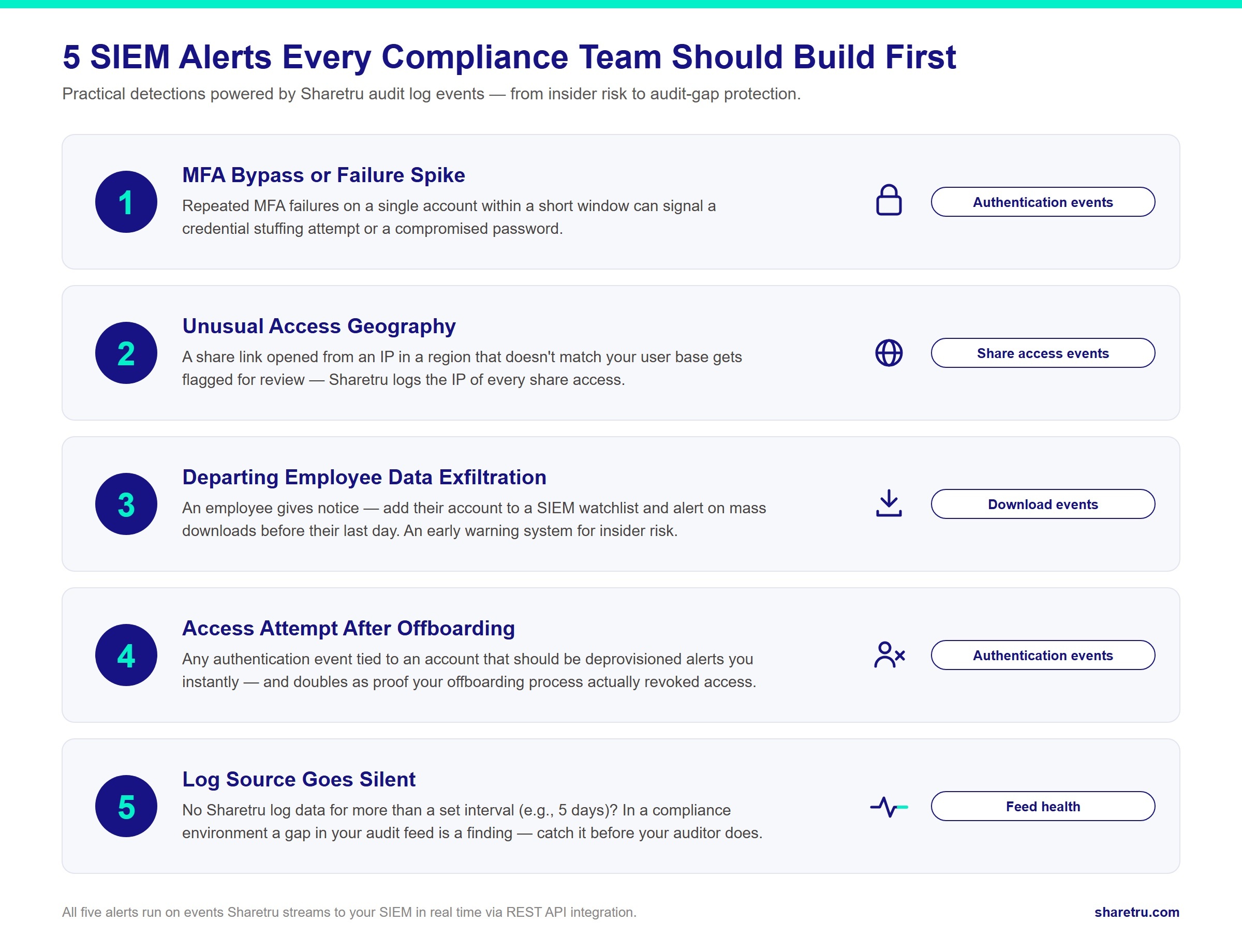
Once logs are flowing, the real value is in what you build on top of them. Here are five alert scenarios compliance and security teams find immediately useful:
Set an alert if MFA verifications fail repeatedly for a single account within a short window. This pattern can indicate a credential stuffing attempt or a compromised account where an attacker is trying different second factors.
If a share link is accessed from an IP address in a country or region that doesn't match your expected user base, trigger an alert for review. Sharetru logs the IP address of every share access event, giving you the raw data to make this call.
Because Sharetru logs downloads with user, filename, and timestamp, you can watch for high-risk behavior tied to a specific individual. A common example: a user submits their two weeks' notice, so you configure a SIEM watchlist for that account and alert on any mass-download activity before their last day. This turns your audit feed into an early warning system for insider risk.
Set an alert for any authentication event — MFA verification, SSO usage, or username entry — tied to an account that should have been deprovisioned. If someone who has left the business attempts to log in after their last day, you'll know immediately, and it doubles as a check that your offboarding process actually revoked access.
This is often the first alert teams configure: a notification when Sharetru stops sending log data for more than five days. In a compliance environment, a gap in your audit log feed isn't just an IT issue — it's a finding. Catching it quickly means you can remediate before it becomes a problem in your next audit cycle.
A question we hear from compliance officers: "If we have an incident, can we get the audit logs to support our investigation?"
Yes — and in most cases, you already have them. Your audit logs are available directly in your Sharetru site's log history folder. If an incident occurs, you can pull the records you need yourself, without contacting us or waiting on a request. That means immediate access to the data behind your incident timelines, root cause documentation, and corrective action evidence — exactly the kind of records your SOC 2 auditors, CMMC assessors, or FedRAMP reviewers will ask for.
Retention is aligned to the standard your environment operates under, and it's built into the platform:
If you have a specific retention requirement beyond what your environment provides, contact our support team to confirm alignment with your needs.
If you're already a Sharetru customer and want to enable SIEM integration:
If you're evaluating Sharetru and SIEM integration is a requirement, bring it up during your demo. It's a first-class feature, not an add-on, and our team can walk you through how it aligns with your specific framework — FedRAMP, CMMC, HIPAA, or SOC 2.