The complete guide · Managed file transfer
Managed file transfer (MFT): move files between people and systems, and prove every one
How managed file transfer works, where it should run, what five years of attacks on file transfer servers taught buyers, and how to check any vendor on evidence instead of features. Six chapters, with a transfer you can step through, a record you can filter and a checklist you can send.
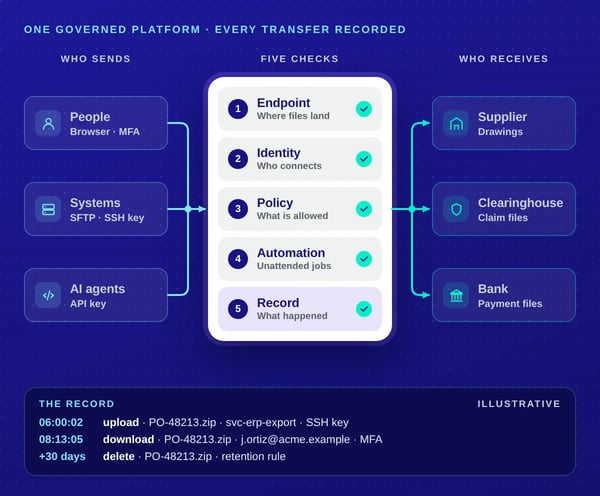
Why does managed file transfer still matter in 2026? Because much of the work between companies still moves as files, and auditors ask you to prove what happened to each one. Drawings go to suppliers, claim batches to clearinghouses, payment files to banks and nightly exports to partners’ systems. A regulator doesn’t ask whether you sent the file. It asks who could reach it, how it was protected and what happened to it next.
MFT at a glance
- Moves files between people, systems and organizations.
- Over SFTP, FTPS, HTTPS and APIs, plus AS2 on some platforms.
- Controls who, what, which protocol, from where and for how long.
- Records every sign-in, upload, download, deletion and permission change.
- Runs on your servers, in your cloud account, or as a hosted service.
- Replaces email attachments, consumer links and unmanaged FTP servers.
Chapters 1 to 5 are vendor-neutral: what MFT is, the protocols and channels it needs, where it should run, what compliance asks of it, and how to choose a vendor. Chapter 6 is about Sharetru, and it says where Sharetru isn’t the right fit as plainly as where it is.
In this guide
Six chapters, from definition to decision
Read them in order, or jump to the one you came for.
Chapter
What is managed file transfer (MFT)?
Software that moves files under central control, and leaves a record of every one.
Managed file transfer (MFT) is software that moves files between people, systems and organizations under central control: encrypted, access-controlled and logged. It replaces the mix of email attachments, consumer sharing links and unmanaged FTP servers with one service where every transfer has an owner, a policy and a record.
What makes a transfer “managed”?
Three things: control over who may move what, protection for the file on the way and at rest, and proof of what happened.
- Control. An administrator decides who may send what to whom, over which protocol, from which network address, and how long a file stays.
- Protection. Files are encrypted in transit and at rest, with cryptographic modules an independent lab has validated, not merely ones described as “compliant”.
- Proof. Every sign-in, upload, download, deletion and permission change is recorded, kept as long as your framework requires, and exportable when an auditor asks.
“Managed” describes the transfer, not who runs the software. You can run MFT on your own servers, run it yourself in a cloud account, or subscribe to a provider who runs it for you, sometimes called MFT as a service (MFTaaS). Chapter 3 covers what each model leaves on your plate.
How does MFT work?
An MFT platform puts five layers between a file and its destination: an endpoint, identity, policy, automation and a record. Each answers one question an auditor will ask, and a gap in any of them is where file transfer usually fails.
One MFT platform · five layers, each answering one question
- 01 Endpoint: where do files arrive? The server partners, people and systems connect to, over SFTP, FTPS, HTTPS or an API. Self-hosted platforms often put it in a DMZ, behind a gateway.
- 02 Identity: who is connecting? Named users, guests and service accounts, each with their own credential. People use passwords, single sign-on and MFA; systems use SSH or API keys.
- 03 Policy: what may they do? Permissions per folder, the protocols each account may use, allowed IP ranges, lockout after failed sign-ins, and how long files stay.
- 04 Automation: what moves without a person? Schedulers, scripts, API calls and folder watchers. Some platforms run this inside the product; others give you a governed endpoint your own scheduler drives.
- 05 Record: what happened? A log of every action: the account, the time, the source address and the file. A record you can export to your SIEM beats a dashboard you can only look at.
Follow one file
What happens to one file, layer by layer?
Each layer checks one thing and writes one line of the record. Step through a purchase order package going from a manufacturer’s ERP to a supplier, and watch the record build up.
-
Step 1 of 6 Endpoint
The auditor asks Where do files arrive?
At 6 a.m., the ERP’s scheduled job connects over SFTP
The manufacturer’s own scheduler starts the job. It connects to the MFT endpoint from the ERP server’s fixed address.
-
Step 2 of 6 Identity
The auditor asks Who is connecting?
It signs in as a service account, with an SSH key
The account belongs to the ERP job, not to a person, so the record shows the system that sent the file. No one’s password is shared with a script.
-
Step 3 of 6 Policy
The auditor asks What may it do?
Policy lets it write to one supplier’s folder, and nowhere else
The account may upload over SFTP only, from that one address, into one folder. Anything else is refused and logged.
-
Step 4 of 6 Automation
The auditor asks What moves without a person?
The arrival sends the supplier’s buyer an email notice
No one at the manufacturer touches the transfer. The notice tells the buyer a package is waiting.
-
Step 5 of 6 Identity
The auditor asks Who is connecting now?
The buyer signs in through a browser, with MFA, and downloads
A person, not a system, so this sign-in uses multi-factor authentication. The download is tied to her name.
-
Step 6 of 6 Record
The auditor asks What happened?
Thirty days later the file is deleted; six months later the auditor asks
A retention rule removes the package once its job is done. When the auditor asks who saw the drawings, the answer is a log export, not a search through inboxes.
How is MFT different from SFTP, FTPS, file sharing and email?
SFTP and FTPS are protocols; MFT governs them. File sharing serves teamwork inside a company; MFT serves exchange across its edge. Most organizations need more than one of these, so the useful question is which job each one does.
| Compared on | Email attachment | Consumer file sharing | File sync and share (EFSS) | SFTP or FTPS server on its own | Managed file transfer (MFT) |
|---|---|---|---|---|---|
| Built for | Messages | Personal sharing | Teams working on documents together | Moving files between systems | Governed exchange between people, systems and organizations |
| Encryption in transit | Depends on both mail servers | HTTPS | HTTPS | SSH or TLS | SSH, TLS and HTTPS |
| Systems connect unattended | No | Rarely | Through an API | Yes | Yes, over protocols and an API |
| External partners | Anyone with the address | Anyone with the link | Guests, usually licensed | Accounts you create by hand | Users and guests, with policy per folder |
| Central policy | Mail rules only | Little | Per site or library | Per server, by hand | Per folder, account and protocol |
| Record of each file action | Sent items | Limited | Activity logs, varying by plan | Server logs, if kept | A searchable, exportable record |
| Typical owner | Everyone | Everyone | The collaboration or IT team | One system administrator | IT, security and compliance together |
Two misreadings are common. “We use SFTP, so we have MFT”: SFTP encrypts the connection, but it doesn’t decide who may connect, keep a record anyone can read, or delete yesterday’s files. “We have SharePoint or Box, so we don’t need MFT”: those are excellent systems of record for people. Unattended transfers with partners who will never take a seat in your tenant are a different job, which is why many companies run MFT beside file sharing rather than instead of it.
Chapter
Which protocols and channels does MFT need?
Your partners’ systems decide most of the list. Ask them before you shortlist vendors.
At minimum, SFTP and HTTPS. Add FTPS for partners on older systems, and AS2 only if your trading partners require it.
| Protocol | What it is | When you need it |
|---|---|---|
| SFTP | File transfer over SSH, port 22 by default. Signs in with a password or an SSH key. | The default for system-to-system transfers. Almost every partner can use it. |
| FTPS (implicit) | FTP wrapped in TLS from the first byte, traditionally on port 990. | Older partner systems built around FTP that can add TLS. |
| FTPeS (explicit FTPS) | FTP that upgrades to TLS with the AUTH TLS command, usually on port 21. | The same partners, when their firewall or client expects port 21. |
| HTTPS | The web’s encrypted protocol. It carries the browser interface and any REST API. | People in a browser, and software calling an API. |
| SCP | Secure copy over SSH. | Old scripts. Recent OpenSSH releases run scp over the SFTP protocol by default, so SFTP support covers most cases. |
| AS2 | Signed, encrypted business messages over HTTP(S), with a signed receipt called an MDN. | EDI with retailers, logistics networks and some supply chains that mandate it. |
| Plain FTP | Unencrypted: credentials and files cross the network in the clear. | Only for an isolated partner that can’t change, and never for regulated data. A good platform lets you switch it off. |
How strong is the encryption behind those names?
The protocol name doesn’t tell you the cipher, so ask three questions: which TLS versions, which SSH key types, and which validated modules. TLS 1.2 is the floor and 1.3 is preferable where a framework asks for it. User keys should include RSA, ECDSA and Ed25519. The cryptographic modules should hold a current FIPS 140 validation certificate; chapter 4 explains why that last question matters.
Where does OpenPGP fit?
OpenPGP isn’t a file transfer protocol: it’s an open standard for public-key encryption, digital signing and authentication of the file itself. A protocol protects a file while it travels; an OpenPGP-encrypted file stays encrypted on disk at both ends, whichever protocol carries it, and its signature proves who sent it and that it wasn’t changed. Banks, payroll and benefits providers often require it. A platform can apply it for you, or you can encrypt files before they’re sent.
Three channels
Who moves files: people, systems or software agents?
All three: an MFT platform needs a governed path for people in a browser, systems over SFTP or FTPS, and software calling an API. If one channel is missing, that traffic goes back to email or a shadow tool, and leaves your record.
-
People
A browser, links and MFA
Staff and partners who send a quote, collect a signed contract or download a drawing package. Partners you exchange with every week should be registered users; partners you exchange with once should be guests whose access expires.
-
Systems
The protocols they already speak
ERPs, EHRs, core banking platforms and scripts on a schedule. They need key-based sign-in, one folder they may write to and nothing else, and IP rules that pin them to known addresses. MFA doesn’t apply: no person is there to answer it, so the key and the network rule do that job.
-
Software and AI agents
Treat an agent like a service account
Integration jobs, reports and AI agents increasingly fetch and file documents through an API. Give each agent its own credential, never a person’s password or a shared key. Scope it to the folders and actions it needs, log it under its own name, rate-limit it and rotate its keys. Remove it the day the project ends.
The test for any platform: can you answer “who moved this file?” with a single name, whether that name is a person, a system or an agent?
Chapter
Where should MFT run, and who carries the risk?
Choose the model by the work you can staff, not by the feature list.
Shared responsibility
Who patches, hardens and answers for each model?
MFT runs on your servers, in your cloud account, or as a provider’s service; what changes is who patches, hardens, monitors and produces evidence. Pick a model to see what stays with you.
-
On your own servers Jobs that stay with you: 10 of 10
-
Self-hosted in your cloud account Jobs that stay with you: 9 of 10
-
Software as a service (SaaS) Jobs that stay with you: 3 of 10, 2 shared
| The job | On your own servers | Self-hosted in your cloud account | Software as a service (SaaS) |
|---|---|---|---|
| Hardware, power and network | You | ProviderThe cloud provider | Provider |
| Operating system patches | You | You | Provider |
| MFT software patches and emergency fixes | You | You | Provider |
| Firewall, DMZ and gateway design | You | You | SharedThe provider designs it; you set IP rules |
| Backups and disaster recovery | You | You | ProviderAsk for the recovery point and recovery time |
| Monitoring and intrusion detection | You | You | ProviderWith the logs available to you |
| Users, permissions and partner onboarding | You | You | You |
| Policy: protocols, retention and MFA | You | You | YouWithin the provider’s controls |
| Audit evidence for the platform | YouYou assemble it | YouYou assemble it | SharedThe provider’s reports, plus your configuration |
| Audit evidence for how you use it | You | You | You |
“Hybrid” and “cloud” often mean the middle column: self-hosted software in your own cloud account. It moves the hardware to someone else and leaves every patch and hardening decision with you.
Does SaaS take compliance off your plate?
No: SaaS moves the running of the platform to the provider, but you still decide who gets access, which protocols are on and how long files stay. Your auditor will still ask you to show those settings.
When is each model the right one?
On-premises fits air-gapped networks and teams that patch internet-facing software within hours; SaaS fits most mid-sized companies. Choose your own servers for workloads that may not leave a tightly controlled environment, or when a security team owns patching around the clock. Choose SaaS where one or two people run IT and the file transfer server is one of forty things they own. The record below is why that distinction matters.
The exploitation record
What did the MOVEit, GoAnywhere and Accellion attacks teach MFT buyers?
File transfer servers facing the internet are prime targets because each holds many partners’ data, and several were exploited before any patch existed. Every product below is software customers install and run themselves.
- 18file transfer vulnerabilities in this record, every one on CISA’s list of flaws exploited in the wild
- 9self-hosted product lines, from eight vendors
- 4campaigns tied to one group: three attributed by CISA and the FBI, one claimed by the group
-
2021
-
Added to CISA KEV November 2021
Accellion File Transfer Appliance (FTA)
Accellion renamed itself Kiteworks in October 2021
SQL injection, command injection and server-side request forgery
CVE-2021-27101CVE-2021-27102CVE-2021-27103CVE-2021-27104
Attributed to TA505, in zero-day campaigns in 2020 and 2021 (CISA and FBI, advisory AA23-158A)
-
Added to CISA KEV November 2021
Serv-U
SolarWinds
Remote code execution
CVE-2021-35211
-
-
2023
-
Added to CISA KEV February 2023
GoAnywhere MFT
Fortra
Command injection before sign-in
CVE-2023-0669
Attributed to The CL0P ransomware group, which CISA and the FBI also identify as TA505 (advisory AA23-158A)
-
Added to CISA KEV June 2023
MOVEit Transfer
Progress
SQL injection before sign-in, exploited as a zero-day
CVE-2023-34362
Attributed to The CL0P ransomware group, which CISA and the FBI also identify as TA505 (advisory AA23-158A)
-
Added to CISA KEV October 2023
WS_FTP Server
Progress
Deserialization before sign-in
CVE-2023-40044
-
-
2024
-
Added to CISA KEV April 2024
CrushFTP
Sandbox escape
CVE-2024-4040
-
Added to CISA KEV July 2024
Serv-U
SolarWinds
Path traversal
CVE-2024-28995
-
Added to CISA KEV December 2024
Harmony, VLTrader and LexiCom
Cleo
File upload leading to code execution
CVE-2024-50623CVE-2024-55956
Attributed to Claimed by the CL0P ransomware group in December 2024 (as reported by CybelAngel)
-
-
2025
-
Added to CISA KEV April 2025
CentreStack and Triofox
Gladinet
Hard-coded cryptographic key
CVE-2025-30406
-
Added to CISA KEV April 2025
CrushFTP
Authentication bypass
CVE-2025-31161
-
Added to CISA KEV July 2025
Wing FTP Server
Code injection
CVE-2025-47812
-
Added to CISA KEV July 2025
CrushFTP
Administrator access through an alternate path
CVE-2025-54309
-
Added to CISA KEV September 2025
GoAnywhere MFT
Fortra
Deserialization in the License Servlet
CVE-2025-10035
Attributed to Storm-1175, a financially motivated group known for deploying Medusa ransomware (Microsoft Threat Intelligence)
-
Added to CISA KEV November 2025
CentreStack and Triofox
Gladinet
File read without signing in
CVE-2025-11371
-
Sources: NIST National Vulnerability Database (opens in a new tab) records, including each CVE’s date in the CISA Known Exploited Vulnerabilities catalog (opens in a new tab); CISA and FBI advisory AA23-158A (opens in a new tab); Microsoft Threat Intelligence (opens in a new tab); CybelAngel (opens in a new tab); Kiteworks’ rename announcement (opens in a new tab). The record lists exploited flaws only, not every vulnerability published.
What should buyers take from the record?
That the risk follows the architecture, not one vendor: concentrated data, internet exposure and patching that falls to whoever runs the server.
- Concentration makes the target. A file transfer server holds files from every partner it serves, so one flaw can expose all of them at once. That is why one group came back to file transfer products four times in four years. In the 2023 GoAnywhere campaign alone, the group claimed to have taken data from about 130 victims.
- Patching fast isn’t enough. Several of these flaws were exploited before a fix existed. What limits the damage is how little data sits on the server, how isolated it is from the rest of your network, and whether your logs show what was taken.
- “Self-hosted” means the emergency is yours. When an advisory lands at 9 p.m. on a Friday, someone on your team must apply the fix, check for compromise and report. Ask whether that person exists, and whether they’d see the advisory in time.
- SaaS moves the work; it doesn’t remove the question. A hosted service faces the internet too. The provider’s engineers patch it, so ask them the same things: who patches, how fast, how you’ll be told, and what their own vulnerability history looks like.
- Ask for the record, not the reassurance. Few vendors can hand you a CVE history, a notice commitment in the contract and an audit report for the period you care about. Chapter 5’s checklist asks for all three.
Chapter
What do compliance and security reviews ask of MFT?
Four asks, seven frameworks, and the part that stays yours.
Most frameworks ask four things of file transfer: control access, encrypt in transit and at rest, record what happened, and prove it. The details differ by framework, and so does the part that stays yours.
Which framework asks for what?
| Framework | What it asks of file transfer | What the platform can cover | What stays yours |
|---|---|---|---|
| CMMC Level 2 and NIST SP 800-171 Defense contractors handling CUI | Access control, audit logging, FIPS-validated encryption for CUI, MFA and media protection | Validated encryption, MFA for people, logs and per-folder access; FedRAMP Moderate if the provider stores CUI | Marking CUI, deciding who may receive it, your system security plan and your assessment |
| DFARS 252.204-7012 | A cloud service that stores CUI must meet the FedRAMP Moderate baseline; incidents reported to DoD within 72 hours | A FedRAMP Moderate listing and the provider’s incident process | Your own 72-hour report |
| ITAR 22 CFR 120–130 | Export-controlled technical data reaches only authorized U.S. persons, or is encrypted end to end as 120.54 describes | U.S. data residency, U.S.-person administration and validated encryption | Export authorizations, deciding who is a U.S. person, and screening partners |
| HIPAA Security Rule 45 CFR 164.312 | Access control, audit controls, integrity and transmission security for ePHI, and a business associate agreement with the vendor | Encryption, logs and access rules, and a signed BAA | Your risk analysis, minimum-necessary decisions and workforce training |
| GLBA Safeguards Rule 16 CFR 314.4 | Encrypt customer information in transit and at rest, require MFA, and oversee service providers | Encryption, MFA, logs and the provider’s SOC 2 report | Your written security program and your oversight of vendors |
| PCI DSS v4 | Strong cryptography for cardholder data sent over open networks | Encrypted protocols and access logs | Scoping, and whether card data should travel as files at all |
| SOC 2 Your own audit | Evidence that your controls operated over a period | The provider’s SOC 2 Type II report for its part | Your controls, including how you configured the platform |
Two habits save time at assessment. Keep the provider’s reports with your own evidence, because assessors ask for the controls you inherit. And set log retention to the longest framework you’re under: HIPAA documentation is kept for six years, and some contracts ask for more.
This table is a starting map, not legal advice. Your assessor and counsel decide what applies to you.
What do FedRAMP and FIPS 140-3 mean for an MFT buyer?
FedRAMP authorizes cloud services for U.S. government data; FIPS 140 validates cryptographic modules. Check both on official lists, because a listing or certificate number is evidence and a vendor’s word isn’t.
FedRAMP. Cloud services are assessed against NIST SP 800-53 controls at Low, Moderate or High impact. Moderate is the level DFARS 7012 points to for services that store CUI. Since February 2026 FedRAMP has called its approved services “Certified” rather than “Authorized”. Every listed service appears on the FedRAMP Marketplace (opens in a new tab) with a package ID. Search it yourself, and note which product and which layer the listing covers: some services are listed as software running on another company’s infrastructure listing, which is normal, but you should know whose package covers what.
FIPS 140. “Validated” means an accredited lab tested the module and NIST’s Cryptographic Module Validation Program (opens in a new tab) issued a certificate with a number you can look up. “FIPS compliant” has no formal meaning. NIST moved FIPS 140-2 certificates to its historical list in September 2026, and new validations are FIPS 140-3. Modules on the historical list can still be used in existing systems, but for new CUI work, ask whether the vendor runs FIPS 140-3 modules and for the certificate numbers.
Three questions settle most claims:
- What is your FedRAMP Marketplace package ID, and which product does it cover?
- What are your CMVP certificate numbers, and are they FIPS 140-2 or 140-3?
- Which TLS versions and SSH algorithms does the endpoint accept today?
Chapter
How do you choose an MFT vendor?
Ask for documents you can verify, count every cost, and plan the move before you sign.
Checklist
How do you evaluate an MFT vendor on evidence, not features?
Ask each vendor for documents you can verify, not demonstrations you can’t; a short evidence list separates vendors faster than a long feature matrix. Tick items as answers arrive, then copy what’s still open into your next email.
Two warning signs. A vendor who calls SOC 2 a “certification”: it’s an attestation report. And a vendor who answers “yes” to every row. Every platform has limits, and the trustworthy ones tell you where theirs are.
What does MFT cost to own?
The licence or subscription is the smallest part; staff time for patching, monitoring, partner onboarding and audit preparation usually costs more over three years. Count both before comparing quotes.
Self-hosted MFT adds servers, backup, a DMZ or gateway, and the hours to keep it all patched. SaaS replaces most of that with a subscription, so check how it’s priced: per user, per guest, per gigabyte, per transfer or per connection. A low entry price with per-guest fees can cost more than a higher flat plan once partners join.
Our guide to retiring an in-house server has a calculator that totals cash and hours over three years, with sourced defaults you replace with your own numbers.
By industry
How do regulated industries use MFT?
The same platform does different jobs by industry: drawings to suppliers in manufacturing, claim files to clearinghouses in healthcare, payment files to processors in banking. These are the exchanges auditors look at first.
-
Defense and aerospace manufacturing
Drawings out, certificates back
Engineering drawings to machine shops and suppliers; inspection records and certificates of conformance back. When the drawings are CUI or ITAR data, the platform needs validated encryption, U.S.-person administration and, if it stores CUI, FedRAMP Moderate. Not every manufacturer handles CUI; many need the same exchange because customers ask for a record.
Aerospace and defense -
Healthcare and life sciences
Claims, results and study data
Claim batches and remittance files with clearinghouses and payers, lab results and imaging with referring providers, study data with sponsors. The anchors are a signed BAA, encryption, and logs kept for six years.
Healthcare -
Banking, credit unions and insurance
Payment files and statements
ACH and payment files to processors, statements and tax forms to print vendors, loan documents from borrowers. GLBA asks for encryption, MFA and oversight of the provider; examiners ask for its SOC 2 report.
Financial services -
Professional services
Documents from clients who won’t install anything
Accountants, law firms and consultants collecting tax documents, discovery files and financial records. A browser and a link clients can trust matter most.
-
Government contractors
Deliverables under named requirements
Data exchanged with agencies and primes, where the contract names FedRAMP or NIST requirements and the evidence has to match them.
FedRAMP and CUI -
Manufacturing and engineering
Packages to the supply chain
CAD files, bills of materials and quality records moving between plants, suppliers and customers, often from an ERP on a schedule.
Manufacturing
How do you move off a legacy FTP server or MFT platform?
Inventory every partner, script and credential first, run old and new side by side, and switch partners over in groups you can roll back. Rushed cutovers break production transfers, not security.
List every account and what connects to it. Move the hostname if it’s a public name you own. Issue new host keys rather than copying old ones. Let partners keep their SSH key pairs where the key type is supported. Test each partner’s first connection before you switch, and keep the old server read-only until the last partner has moved. Our guide to retiring an in-house server walks through each step of the cutover.
Chapter
Where does Sharetru fit, and where doesn’t it?
The one chapter about us, so it lists both.
Sharetru is cloud MFT for regulated mid-sized organizations that need people and systems on one governed platform, with audit evidence included. It isn’t for every MFT job, so this chapter lists both sides.
Where it fits
- One platform for all three channels. A web app and links for people; SFTP, SCP, FTPS, FTPeS and HTTPS for systems; a 60-endpoint REST API for software. Plain FTP is available on Sharetru Commercial, off until you turn it on, and not on Sharetru Federal.
- Partners at no seat cost. Guests are unlimited on every plan.
- Notices and clean-up built in. Email notifications on upload, download and deletion per folder, and retention rules that delete files after a set number of days.
- Evidence you can check. SOC 2 Type II Attested. HIPAA Security Rule audited annually by A-LIGN, with a BAA. Sharetru Federal is FedRAMP Rev 5 (Class C) Certified (the new name for FedRAMP Moderate), listed on the FedRAMP Marketplace under package F1311222650.
- Encryption by platform. AES-256 at rest. TLS 1.2 with FIPS 140-2 validated modules on Sharetru Commercial; TLS 1.3 with FIPS 140-3 validated modules on Sharetru Federal.
- Run for you. Sharetru patches, backs up and monitors it: a 99.9% uptime SLA (opens in a new tab), 30 days of incremental backups, and data stored in the U.S.
- A record that lasts. Logs kept 3 months on Core, 6 on Complete, 12 on Sharetru Federal and 72 with the HIPAA Support Package.
- A clean history. Sharetru has never had a security incident affecting customer data.
Where it doesn’t
| What you need | On Sharetru | What to do instead |
|---|---|---|
| AS2 transfers or OpenPGP file encryption | Neither is supported | A platform that supports them, or encrypt and sign files with OpenPGP before they reach Sharetru |
| A scheduler or workflow engine inside the platform | None, and no webhooks: your scheduler, scripts or the API drive transfers, and Sharetru governs and records them | Keep jobs where they run and point them at Sharetru, or choose a platform with a built-in scheduler |
| Installation on your own servers, or air-gapped | Hosted service only | A self-hosted product, with the patching that comes with it |
| DoD Impact Level 4 or higher | FedRAMP Rev 5 (Class C) Certified, not IL4 | A service authorized at the level your contract names |
| Kept prior versions of each file | Every action is recorded, but prior versions aren’t kept; support can restore a deleted or overwritten file from 30 days of backups | A system of record with versioning, for rules such as SEC 17a-4 |
| MFA on SFTP | SFTP sign-ins use passwords or SSH keys, with IP and protocol rules on top; MFA applies to people in the web app | Keys and IP rules for systems, MFA for people |
People and systems have exchanged files on Sharetru since 2010. A 15-day free trial and a 60-minute demo are both open, and the conversation can start from how you move files today.
Questions
What buyers ask about managed file transfer
Each answer stands on its own, so you can send one to a colleague.
-
Is SFTP the same as MFT?
SFTP isn’t MFT on its own. SFTP is a protocol that encrypts a file transfer over SSH; MFT is a platform that controls who may use SFTP and other protocols, enforces policy and records every action.
-
Is MFT the same as file sharing?
MFT and file sharing overlap but do different jobs. File sharing tools are built for colleagues working on documents; MFT is built for governed exchange with partners and systems, including unattended transfers and a record an auditor can use.
-
What is the difference between MFT and EDI?
EDI is a format for business documents such as purchase orders and invoices; MFT is how files move. EDI messages often travel over AS2 or SFTP, and an MFT platform can carry them without reading them.
-
What is MFT as a service (MFTaaS)?
MFTaaS is managed file transfer delivered as a hosted service. The provider runs, patches and monitors the platform; you control users, policy and retention.
-
Do I need MFT if I already use Microsoft 365?
Many Microsoft 365 organizations add MFT beside it. SharePoint and OneDrive serve people inside your tenant; MFT serves partners and systems outside it, over SFTP, FTPS and an API, with a record of every exchange.
-
Does MFT need to support AS2?
An MFT platform needs AS2 only if your partners require it. AS2 is common in retail, logistics and some EDI supply chains; many regulated companies never need it.
-
What is a DMZ gateway in MFT?
A DMZ gateway is an internet-facing relay that partners connect to, so they never reach the server holding the files. It matters for self-hosted MFT; with SaaS the provider designs that boundary.
-
What is guaranteed delivery in MFT?
Guaranteed delivery means a transfer that fails partway is retried or resumed, and the sender can confirm the file arrived. Ask whether a platform does this itself, or whether your scripts must check and retry.
-
Can an MFT platform replace email attachments for sensitive files?
An MFT platform can replace attachments for any file that needs control and a record. The sender uploads once, the recipient gets a link or an account, and every download is logged instead of copies sitting in mailboxes.
-
Is cloud MFT safe for CUI?
Cloud MFT can carry CUI when the service meets the FedRAMP Moderate baseline, uses FIPS-validated encryption and is administered by U.S. persons. Check the FedRAMP Marketplace listing yourself.
-
How long should MFT logs be kept?
Keep MFT logs as long as your longest applicable requirement. HIPAA documentation is kept six years; other frameworks and contracts vary, so set retention to the strictest one.
-
Does MFT stop ransomware?
No file transfer platform stops ransomware alone. MFT reduces exposure by keeping fewer files on the server, restricting who and what can connect, and recording every action, so you can show what was or wasn’t reached.
-
How long does it take to move to a new MFT platform?
The time depends on the number of partners and scripts, not on data volume. Inventory first, then move partners in groups, testing each first connection before switching.
-
Do partners need to install software?
Partners rarely need new software: systems keep the SFTP or FTPS clients they already run, and people use a browser.
Terms
Glossary
The terms used in this guide, in one line each.
-
AS2
A protocol for signed, encrypted business messages over HTTP(S), with a signed receipt (MDN).
-
Audit trail
The record of every action on the platform: who, what, when and from where.
-
CMVP
NIST’s Cryptographic Module Validation Program, which issues FIPS 140 certificates.
-
CUI
Controlled Unclassified Information: U.S. government information that needs safeguarding but isn’t classified.
-
DMZ
A network zone between the internet and the internal network, where internet-facing servers sit.
-
EFSS
Enterprise file sync and share: collaboration platforms for documents inside an organization.
-
FedRAMP
The U.S. government program that assesses and lists cloud services against NIST SP 800-53.
-
FIPS 140-3
The current U.S. standard for validating cryptographic modules; it replaced FIPS 140-2.
-
FTPS and FTPeS
FTP secured with TLS, implicitly from the start (FTPS) or explicitly after an AUTH TLS command (FTPeS).
-
Guest
An external person given limited, usually time-bound access to send or receive files.
-
KEV
CISA’s Known Exploited Vulnerabilities catalog: flaws attackers have used in the wild.
-
MDN
Message Disposition Notification: the signed receipt AS2 returns.
-
MFTaaS
Managed file transfer delivered as a hosted service.
-
OpenPGP
An open standard (RFC 9580) for public-key encryption, digital signing and authentication of files. Not a transfer protocol: it protects the file whichever protocol carries it.
-
Retention rule
A policy that deletes files after a set number of days.
-
RPO and RTO
Recovery point objective (how much data you can lose) and recovery time objective (how long until service returns).
-
Service account
A non-human account used by a system, script or agent.
-
SFTP
The SSH File Transfer Protocol.
-
SIEM
Security information and event management: the system that collects logs for analysis.
-
SOC 2 Type II
An independent auditor’s attestation that a service’s controls operated over a period, usually six to twelve months.
Go deeper
Where each topic is covered in full
This guide is the overview. These pages hold the detail.
-
Retiring an in-house server
The cost calculator, what changes for partners, and a cutover you test first.
The in-house server guide -
CUI, CMMC and FedRAMP
The questions defense contractors ask about sharing CUI, answered one by one.
CUI file sharing FAQ -
The record
What a platform should log, how long to keep it, and how it reaches an auditor.
Security and audit -
Protocols and the API
SFTP, FTPS, SCP, HTTPS and a REST API, with service accounts and keys.
Automation, SFTP and the API
Sources
NIST National Vulnerability Database (opens in a new tab) (CVE records and CISA KEV dates for chapter 3) · CISA Known Exploited Vulnerabilities catalog (opens in a new tab) · CISA and FBI advisory AA23-158A, #StopRansomware: CL0P Ransomware Gang Exploits CVE-2023-34362 MOVEit Vulnerability (opens in a new tab) · Microsoft Threat Intelligence, Investigating active exploitation of CVE-2025-10035 (opens in a new tab) · CybelAngel, Cleo CVE-2024-50623 and CVE-2024-55956 explained (opens in a new tab) · Kiteworks, Accellion’s brand name is now Kiteworks (opens in a new tab) · FedRAMP Marketplace (opens in a new tab) · NIST Cryptographic Module Validation Program (opens in a new tab) · NIST SP 800-171 and SP 800-53 · 32 CFR 170 (CMMC) · DFARS 252.204-7012 · 22 CFR 120.54 · 45 CFR 164.312 · 16 CFR 314 · PCI DSS v4 · IETF RFC 4130 (AS2) · OpenSSH release notes (scp over SFTP). Sharetru facts: the Sharetru Knowledge Base, the plan page and the product owner. Not legal advice.
Next step
Talk through how you move files today
Bring your partner list and your scripts. We map each transfer to where it would land on Sharetru, and say on the call where it wouldn’t.
Not ready to talk? Run the vendor checklist against whoever you use today. Want to see the product first? The demo runs 60 minutes.
Talk through your setupRequest a demoSee plans and start a trial
15-day free trial · Unlimited guests on every plan · Sharetru Commercial for business data, Sharetru Federal for CUI and ITAR
What happens next
- Pick a time. Thirty minutes, no slides.
- Bring the list. Partners, scripts, protocols and the frameworks you answer to.
- Leave with the mapping. What fits, what doesn’t, and what to check first.